

China USB Type-C Cable: The Ultimate Buyer's Guide for Fast Charging and Data Transfer
2026-10-09
Ever grabbed a USB-C cable and wondered why your phone takes forever to charge or your file transfer crawls? You're not alone. The market is flooded with options, but not all Type-C cables are created equal—especially when it comes to fast charging and reliable data transfer. That's where EBCYX steps in. In this guide, we'll cut through the noise and help you find the perfect China-made USB Type-C cable for your needs, whether you're powering up a laptop or syncing gigabytes of data. Get ready to make an informed choice.
The E-Marker Chip: Why It Decides What Your Cable Can Do
The little chip tucked inside your USB-C connector is easy to ignore, but it quietly calls the shots on what the cable can actually handle. Known as the E-Marker, this tiny integrated circuit stores the cable's identity: its supported data speeds, maximum current, and voltage ratings. Without it, the connected devices have no reliable way to know if the wire can carry 10Gbps data or safely deliver 5 amps.
When you plug in, the host device reads the E-Marker over the configuration channel before enabling fast data or high-power charging. If the chip reports support for USB 3.2 and 5A current, the phone or laptop will open up full performance. But if the chip is absent, counterfeit, or simply outdated, the cable gets treated as a basic USB 2.0 link with a 3A ceiling. That's why two cables that look identical can behave completely differently.
Think of the E-Marker as a passport at a border checkpoint. A cable with a valid, detailed passport sails through with 4K video, 100W charging, and rapid file transfers. One without proper documentation gets held back to slow charging and USB 2.0 speeds, no matter how thick its copper wires are. So next time a cable underperforms, don't blame the connector shape — the chip inside is the one making the rules.
When a 100W Claim Turns Into a 60W Reality
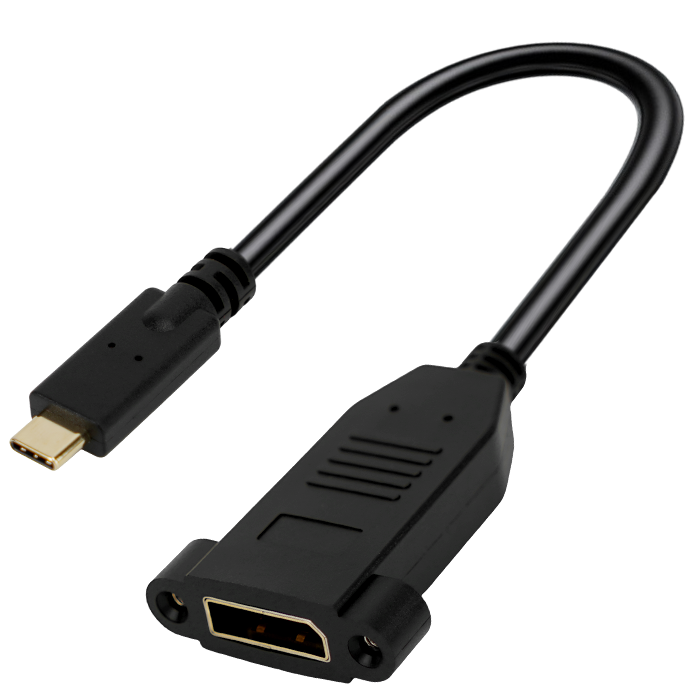
That 100W label on the box rarely means what you think it does. Plug in your laptop, check the charging rate, and you might see 60W — sometimes less. The number isn't a lie, exactly, but it's usually a peak figure reached only for a few seconds under ideal lab conditions. Real-world use involves heat, cable resistance, and device negotiation that quietly caps the output.
Heat is the biggest reason for the gap. A compact charger can't dissipate 100W continuously without throttling, so it backs off to keep its plastic shell from cooking. Different fast-charging protocols also play a role: if your phone or laptop doesn't speak the same proprietary language as the charger, it defaults to a lower universal standard. Add in a mediocre cable, and that theoretical 100W becomes a steady 60W without any warning label on the package.
USB 3.2 Labels That Don't Match the Wires Inside
The naming scheme for USB 3.2 has become a masterclass in confusion. A cable labeled "USB 3.2" might be Gen 1, which is just a rebranded USB 3.0 running at 5Gbps, or Gen 2 at 10Gbps, or the rarer Gen 2x2 at 20Gbps. But the printed label often says nothing about the actual wire count inside. Many budget cables carry the USB 3.2 badge while only routing the four legacy USB 2.0 lines, leaving the SuperSpeed pairs completely unconnected. The result is a cable that negotiates at 480Mbps regardless of what the jacket claims.
This mismatch becomes obvious when you cut open a cheap "USB 3.2" cable. Instead of the required shielded twisted pairs for high-speed data, you might find only a simple power and ground pair with two unshielded data wires. Such cables can still charge a phone, but they will never deliver the transfer speeds the label implies. Even worse, some hubs and adapters use the Gen 1 name to suggest modern performance while internally using a single-lane controller that tops out far below Gen 2 speeds.
The practical takeaway is to ignore the USB 3.2 label on its own and look for the actual speed notation or certified logos. A cable marked "10Gbps" or "20Gbps" is more likely to have the correct internal wiring than one that just says "USB 3.2." If the price seems too good for a high-speed cable, it probably means the manufacturer saved money on the copper inside, not on the marketing outside.
Bend Radius, Jacket Wear, and Other Field Failure Signs
Cables that get pulled too tight around corners often show flattening or kinking on the inner curve. The insulation may look compressed, and in extreme cases the conductor itself takes a permanent set. Once the bend radius is violated, micro-cracks start forming inside the dielectric, even if the outer jacket looks intact. These hidden fractures lead to intermittent signal loss long before a full break happens.
Jacket wear tells a different story. Look for shiny spots where the cable rubbed against conduit edges or sharp tray lips. Abrasion strips away the outer layer slowly, exposing the shield or armor beneath. In wet locations, that worn area becomes a corrosion entry point. Greenish residue or white powder around the worn patch indicates moisture has already reached the metallic layers.
Other field signs are easy to miss if you're not looking. Crushed sections from heavy foot traffic leave flat spots that change impedance. Heat damage near machinery shows up as discolored or melted insulation, sometimes with a distinct burnt odor. Rodent chew marks often appear in clusters, and the exposed copper will oxidize to a dull brown. Each of these clues points to a specific failure mode, and catching them early prevents a full outage later.
Compatibility Tests That Reveal Hidden Charging Gaps
Most people assume a charger is a charger, but running a real compatibility test across devices quickly proves otherwise. Swap a high-wattage laptop adapter onto a phone and it may trickle charge at a fraction of its rated speed. Plug an older cable into a fast-charging power bank and the handshake fails silently, leaving you with a dead battery by lunch. These gaps rarely show up on spec sheets because they live in the negotiation layer between port, cable, and device firmware.
A practical test involves cycling the same three cables and two chargers through a phone, tablet, earbuds, and a power bank while logging the actual wattage drawn at 20%, 50%, and 80% battery. You'll likely find one cable that only delivers USB 2.0-level power when paired with a GaN charger, or a tablet that refuses anything below 15 volts. The hidden gaps are often repeatable, not random: a slight oxidation on a connector pin, a missing e-marker chip in the cable, or a proprietary fast-charge protocol that defaults to 5V/1A.
Rather than guessing, use a cheap USB-C power meter and record the volts and amps at each step. The most revealing test is cold-boot charging from 0% on each device. Many batteries accept high current only after a warm handshake, so the first five minutes matter more than the average speed. If a setup is consistently slower than the charger's rating, the gap is real—and fixable only by swapping the cable or changing the charging port, not by buying a bigger brick.
What a Factory Audit Tells You That a Spec Sheet Won't
A spec sheet will list the materials, dimensions, and tolerances, but it won’t show you whether the injection molding machines are actually calibrated or if the assembly line has one overworked inspector checking a thousand units an hour. During an audit, you can watch how operators handle defects, whether they follow the written SOP when nobody is looking, and if the raw material storage is clean enough to prevent contamination. These observations reveal the gap between what a factory claims and what it consistently delivers.
You’ll also spot capacity issues that never appear on paper: a factory may promise 10,000 units a month, but if the curing oven is shared across three other orders or the packing area can’t hold more than two pallets at once, that number starts to crumble. An audit lets you check maintenance logs, talk to line workers about rush orders, and see whether the QC team actually records every rejection or quietly reworks parts to keep the numbers green.
Financial stability and labor practices usually stay off a spec sheet too. An in-person visit can reveal high turnover, delayed wage payments, or a sudden shift to night-only production—all signals that your order might be prioritized below a bigger client’s. These are the kinds of risks you can only catch by walking the floor, not by reading a neatly formatted PDF.
FAQ
Look past the fast charging label. The cable must support USB Power Delivery (USB PD) and have an E-marker chip if it is rated above 3A. For phones that use proprietary standards like SuperVOOC or Warp Charge, you need a cable with the right extra pin or thicker internal wiring. A safe bet is a cable rated for 100W (20V/5A) with 22AWG or lower power wires, which handles nearly every phone and most laptops without voltage sag.
Cheap cables often skip the 56k ohm pull-up resistor on legacy A-to-C cables, which can make a device draw more current than the port can handle. Look for USB-IF certification or at least a clear statement of compliance with the USB Type-C spec. Also check user reviews for mention of hot connectors or intermittent charging. Buy from a supplier that shows internal construction photos and offers a warranty, even if it costs a few cents more.
Charging and data transfer use separate wire pairs inside the cable. Many budget cables only populate the power and USB 2.0 data lines to cut manufacturing cost, so they are fine for charging but top out at 480Mbps. To get 5Gbps, 10Gbps, or 40Gbps, the cable needs extra shielded twisted pairs and usually an E-marker. Check for USB 3.2 Gen 1/2, USB4, or Thunderbolt 3/4 in the spec sheet, not just the connector shape.
Yes, but you have to separate the tiers. Many top global brands have their cables made in China by ODM factories with strict quality control. At the same time, there are countless low-end workshops selling cables that barely meet basic electrical safety. So the country of origin is less important than the specific factory, its certifications, and its willingness to provide test reports. Ask for samples and check for consistent soldering, proper strain relief, and genuine connectors.
For 100W charging, every extra meter adds resistance and voltage drop. I recommend staying under 2 meters for full power delivery; beyond that, the cable needs thicker copper or an active circuit. For 10Gbps or higher data, passive cables are usually limited to about 1 meter, while active cables can stretch to 2 meters or more. If you mostly charge at a desk, a 1-meter 100W cable is the sweet spot for performance and tidiness.
Braiding mainly improves mechanical durability and reduces tangling. It does not increase charging speed or data rate. A braided cable can still have thin 28AWG power wires inside, so it might underperform a plain rubber cable with 22AWG wires. If you carry the cable daily or have pets that chew, braiding is worth it. Otherwise, spend the budget on better internal conductors and a reinforced connector housing.
Request a sample order first and stress-test it with a USB power meter and a data transfer benchmark. Ask for the factory ISO 9001 certificate, USB-IF certification for the specific cable model, and any relevant safety marks like CE, FCC, or RoHS. Agree on a written quality standard that covers pin soldering, resistance, and connector fit. Then do a small pilot batch before committing to a large order, because consistency across production runs is the real challenge.
Conclusion
When shopping for a China USB Type-C cable, the tiny e-marker chip often matters more than the marketing on the box. This chip tells your phone and charger exactly what the cable can handle, and without it—or with a cheap clone—a cable stamped “100W” may quietly limit itself to 60W, slowing down your laptop and leaving your power brick underused. The same goes for data speed: a cable labeled USB 3.2 or 10Gbps can hide older, thinner internal wiring that barely manages USB 2.0 speeds. You won't notice until you transfer a large file and watch the progress bar crawl.
Beyond specs, real-world durability and compatibility separate dependable cables from disappointing ones. Bend radius and jacket wear around the connector are early warning signs—a stiff or cracking jacket often means broken shielding and intermittent charging within months. Compatibility testing exposes hidden gaps, like a phone that fast-charges on one adapter but not another because the cable can't negotiate the right voltage. Finally, a factory audit reveals what a spec sheet never will: whether strain reliefs are molded properly, solder joints are clean, and wire gauge matches the claimed rating. Spending a little more on a cable that survives flexing and actually delivers its rated power and data speed is far cheaper than constantly replacing “bargain” cables.
Contact Us
Contact Person: David Yang
Email: [email protected]
Tel/WhatsApp: 8615814734054
Website: https://www.ebcyx.com/